Video Lightbox
A play button, image card, text link or Animated Button that opens a YouTube, Vimeo or self-hosted video in a lightbox. Nothing from the video site loads before the click.
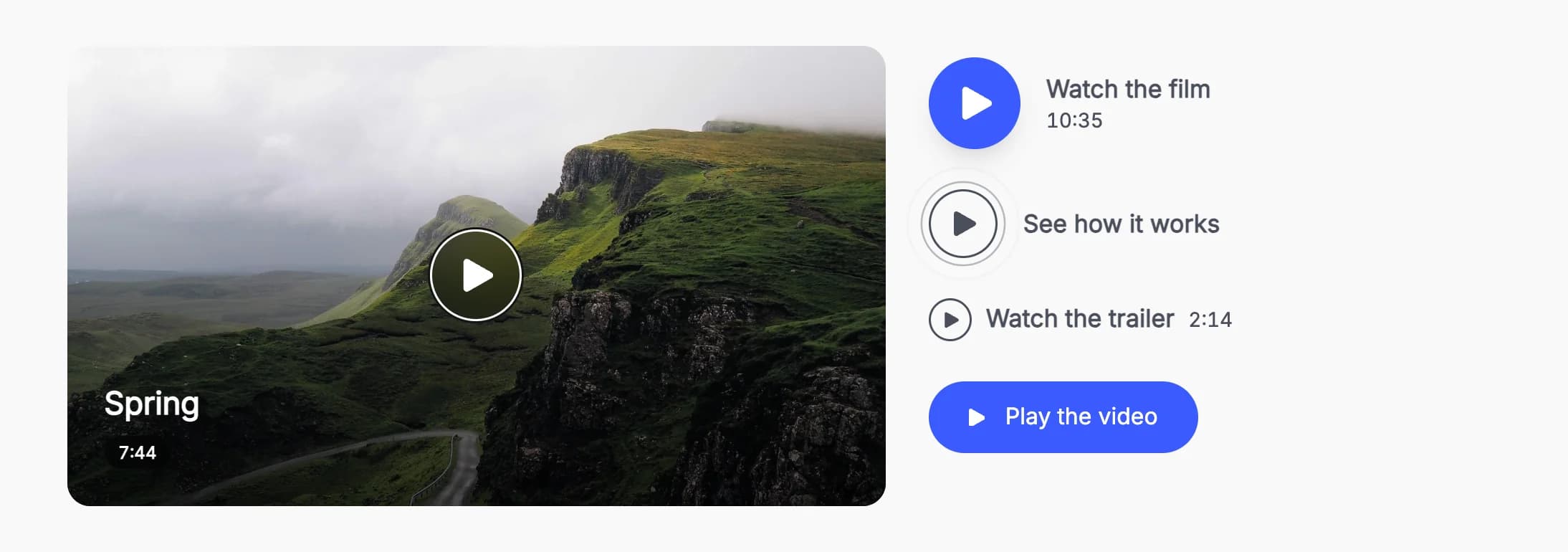
Video Lightbox puts a trigger on the page that opens a video in the theme's lightbox: a round play button, an image card, a text link or an Animated Button. It plays YouTube (Shorts too), Vimeo (unlisted videos too), other sites WordPress can embed, and video files from your Media Library. Nothing from the video site loads until a visitor clicks.
Add it
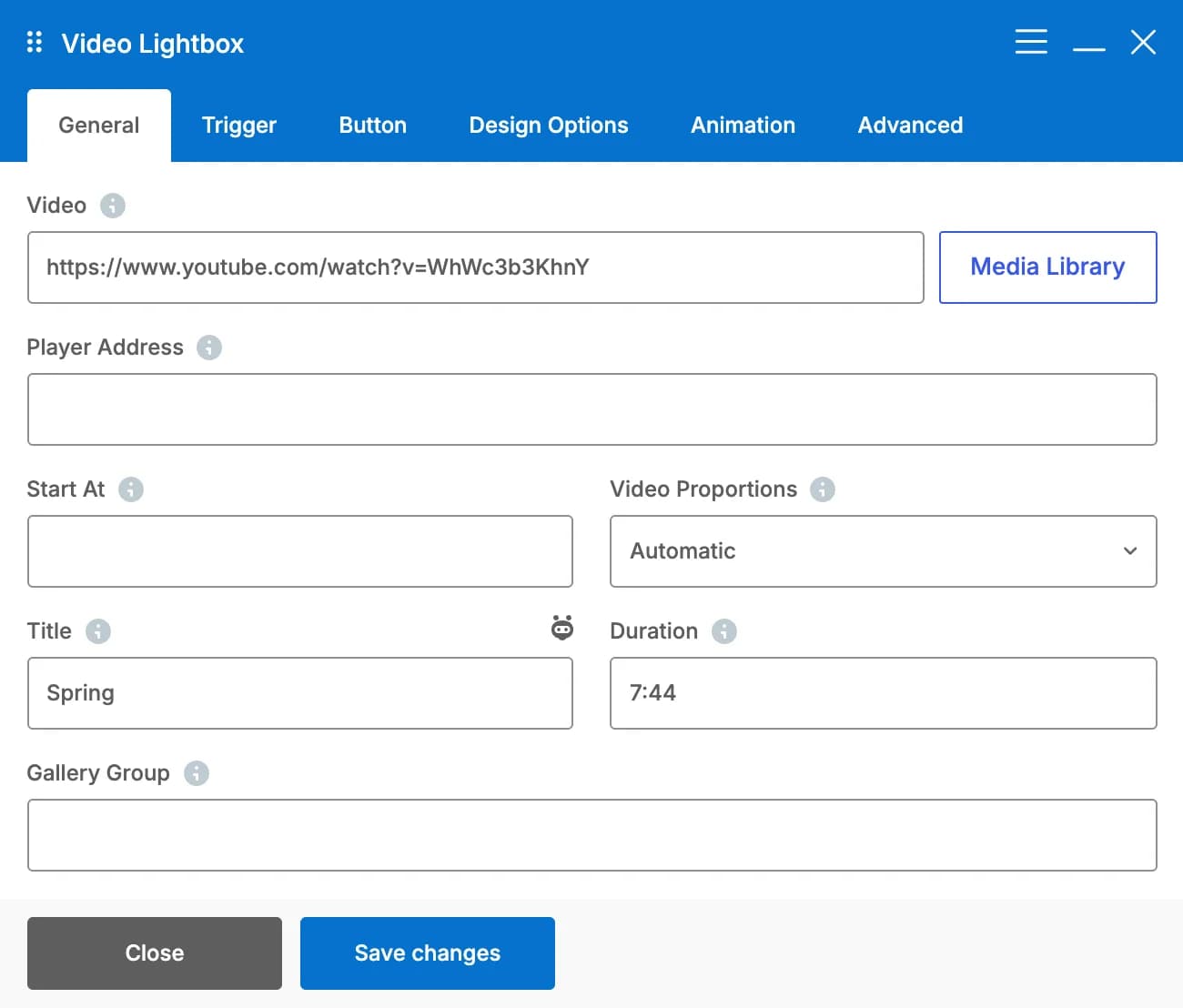
In WPBakery, click Add Element and pick Video Lightbox from the Highend Shortcodes category, then paste a video link in Video. Or use the shortcode. See Shortcode.
When the video can't be played (an empty or unknown link), visitors see nothing, and logged-in editors see a short note in its place.
Settings
videoA YouTube or Vimeo link (unlisted Vimeo links too), another link WordPress can embed, such as Dailymotion, TikTok or VideoPress, or an MP4 or WebM file. Click Media Library to pick a video you uploaded. See Video sources.
embedOptional, for players WordPress can't embed, such as Wistia or Loom: the address from their embed code (the iframe's src), starting with https://. Used instead of Video. See Player Address.
startOptional. Starts the video at this time, for example 1:30, 90 or 1m30s. Works with YouTube, Vimeo, Dailymotion and video files. A t= time in a YouTube or Vimeo link works too.
AutomaticratioThe shape of the player. Options: Automatic, Wide (16:9), Vertical (9:16), Standard (4:3), Square, Cinema (21:9). Automatic uses the video's own: 9:16 for YouTube Shorts and TikTok.
titleNames the video for screen readers, and shows on the image card and under the video in the lightbox.
durationOptional, for example 2:14. Shown with every trigger except the Animated button.
groupOptional. Videos and images with the same group name open together, with arrows to browse them. Image Frames join with the same Gallery REL attribute.
Trigger tab
Play buttontriggerWhat visitors click to play the video. Options: Play button, Image card, Text link, Animated button (set up in the Button tab).
imageThe image of the image card. It also shows while the video loads, and as its thumbnail when it opens with other items.
Watch the videolabelNext to the play button, or the text of the link or button. Leave empty for a play button on its own. Not shown for the image card.
Right of the buttonlabel_positionOptions: Right of the button, Below the button. The duration goes under the text. Only shown for the play button.
Automaticbutton_styleOptions: Automatic, Solid, Light, Glass, Ring with a slow pulse. Automatic is Solid, and Glass on an image card. Light and Glass suit photos. Colors adjust to what is behind the button, so the icon stays readable. Only shown for the play button and the image card.
Medium (64px)sizeOptions: Small (48px), Medium (64px), Large (88px), Extra large (112px). Only shown for the play button and the image card.
colorThe Solid fill, the Ring, the Light style's icon, the Glass tint, or the link. Leave empty for the accent color (the text color for Ring and the link). Not shown for the Animated button.
icon_colorLeave empty for white or near black, whichever reads better. Only shown for the play button and the image card.
magneticThe button leans toward the mouse when it comes close. Not on touch screens or with reduced motion. Only shown for the play button.
Wide (16:9)card_ratioOptions: Wide (16:9), Landscape (3:2), Standard (4:3), Square, Portrait (4:5), Vertical (9:16), Cinema (21:9), Original. Only shown for the image card.
Centerplay_positionOptions: Center, Bottom left, Bottom right. Only shown for the image card.
followOver the image, the play button follows the mouse and becomes the pointer. Not on touch screens or with reduced motion. Only shown for the image card.
AutomaticoverlayOptions: Automatic, Gradient at the bottom, Dim the whole image, None. Automatic adds a gradient under the title, and nothing without one. Only shown for the image card.
overlay_colorThe color of the gradient or dim. Leave empty for black. Not shown when Overlay is None.
Slow zoomhoverOptions: Slow zoom, Lift, None. Only shown for the image card.
16radiusIn pixels. Only shown for the image card.
Roundcorner_shapeHow the rounded corners are drawn. Options: Round, Squircle, Soft squircle, Bevel (cut corners), Scoop (inward curve), Notch (inward square). Browsers without corner shape support show normal rounded corners. Only shown for the image card.
YescaptionShows the Title and Duration from the General tab on the image. On small cards the duration hides and the title gets smaller. Only shown for the image card.
Yesplay_iconA small play icon before the button text. Only shown for the Animated button.
LeftalignOptions: Left, Center, Right. Not shown for the image card, which fills its column.
Button tab
The Animated Button's own settings (style, size, arrow, colors, typography and the rest), used when Trigger is Animated button. Its text comes from Text in the Trigger tab, and the button opens the video instead of a link.
Common settings
Video Lightbox also has a CSS box in the Design Options tab, Entrance Animation and Entrance Delay in the Animation tab, and an Extra class name field in the Advanced tab. See the Elements overview.
Video sources
| Source | Example | Notes |
|---|---|---|
| YouTube | https://www.youtube.com/watch?v=…, https://youtu.be/…, https://www.youtube.com/shorts/… | Live and embed links work too. Plays from youtube-nocookie.com, YouTube's privacy-enhanced mode. Shorts open in 9:16. |
| Vimeo | https://vimeo.com/123456789, https://vimeo.com/123456789/abc123def4 | Unlisted videos keep their hash. Plays with Vimeo's Do Not Track. |
| Other sites | Dailymotion, TikTok, VideoPress and any other provider WordPress can embed | Your site asks the provider for the player address once and remembers it for a month. TikTok opens in 9:16. |
| Video files | .mp4, .m4v, .webm, .ogv, .mov | Pick one with Media Library or paste its address. Plays in the browser's own player, with the card's Image as the poster. |
Videos start playing as soon as the lightbox opens, with sound where the browser allows it and muted otherwise.
Player Address
For players WordPress can't embed, paste the address of their player (the src of the iframe in their embed code) in Player Address. It's used instead of Video. Players on these sites work on any page, whoever wrote it:
| Host | The address must start with |
|---|---|
| www.youtube-nocookie.com, www.youtube.com, youtube.com | /embed/ |
| player.vimeo.com | /video/ |
| www.tiktok.com | /player/ |
| geo.dailymotion.com | /player |
| www.dailymotion.com | /embed/ |
| fast.wistia.net, fast.wistia.com | /embed/ |
| www.loom.com | /embed/ |
| video.wordpress.com, videopress.com | /embed/ |
| streamable.com | /e/ |
| player.mux.com | / |
| iframe.mediadelivery.net (Bunny Stream) | /embed/ |
| Any subdomain of cloudflarestream.com | / |
| play.vidyard.com | / |
| player.twitch.tv | / |
| archive.org | /embed/ |
| embed.ted.com | /talks/ |
The address must start with https://, without a port number or a user name.
A player address on any other site only works when the page's author can post unfiltered HTML (by default, administrators and editors on a single site, and only super admins on a multisite network), the same rule WordPress uses for raw iframes. Such a page opens in a sandboxed frame, which can't navigate your page, open windows or send forms. Otherwise the element shows nothing to visitors.
Developers can add a player to the list with the highend_lightbox_embed_hosts filter. Keys are host names (*.example.com matches any subdomain, but not example.com itself) and values are the path the address must start with:
add_filter( 'highend_lightbox_embed_hosts', function ( $hosts ) {
	$hosts['player.example.com'] = '/embed/';
	return $hosts;
} );
The lightbox's script checks the same list. See Filter hooks for the related filters.
Privacy
Nothing from YouTube, Vimeo or any other video site loads before a visitor clicks: the trigger is a plain link with your own image or button, and the player is only added when the lightbox opens. It's removed again when the visitor closes the lightbox or moves to another item. YouTube videos play from youtube-nocookie.com, and Vimeo videos with Do Not Track.
Shortcode
[hb_video_lightbox video="https://www.youtube.com/watch?v=aqz-KE-bpKQ" trigger="image" image="123" title="Our story" duration="2:14"]image takes an attachment ID. Animated Button settings take a btn_ prefix, for example btn_style="outline" and btn_arrow="circle".
The Video Lightbox element always opens the theme's lightbox, even when the Lightbox switch in Highend Modules is off for a lightbox plugin.